
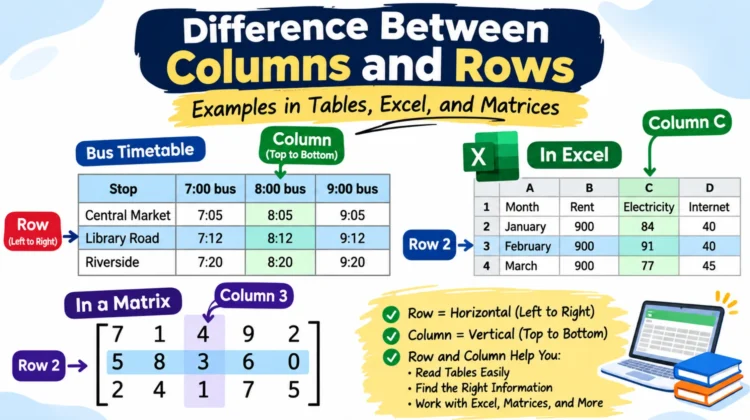
Ask which way your eyes move, and you’ve found the difference between columns and rows: sideways along a row, downward along a column. Rows lie flat, left to right, and columns stand upright, top to bottom. You’ll meet both in spreadsheets, exam halls, math matrices, and plain tables, and this article walks through each, starting with the table you read most often.
What Do Rows and Columns Mean in a Table?
A table puts related facts within easy reach, so you can find what you need at a glance. Odds are you read one every week without noticing, such as this bus timetable:
| Stop | 7:00 bus | 8:00 bus | 9:00 bus |
| Central Market | 7:05 | 8:05 | 9:05 |
| Library Road | 7:12 | 8:12 | 9:12 |
| Riverside | 7:20 | 8:20 | 9:2 |
Slide your eye along the Library Road row, and you see every bus that passes that stop: 7:12, 8:12, 9:12. Slide it down the 8:00 bus column, and you follow one bus through its trip: 8:05, 8:12, 8:20. A row answers “what comes through here?” A column answers “where does this one go?”
Look at what the rows stand for. They’re stops, not people or products, whereas a customer list gives every person a row. The table’s designer makes that call, and my advice is to pick one meaning for rows and hold to it. The columns usually fall into place after that.
Labels can sit on either axis. A column header caps a column (“8:00 bus”), and a row header starts a row (“Library Road”). Most data tables only use column headers, but a lookup grid like this one needs both, since you search by stop and by bus.
See Also: Difference Between I Need and I Want: Meaning and Examples
Row and column cell: where the two meet
The cell holding 8:12 sits at Library Road and the 8:00 bus, and that pairing says exactly which stop and which bus it describes. Each cell holds one entry. Rows and columns are simply the two ways of gathering cells into lines.
Rows and Columns Side by Side
| Feature | Row | Column |
| Direction | Horizontal | Vertical |
| Read | Left to right | Top to bottom |
| In a customer-style data table | Usually one record | Usually one category |
| In a database | A record | A field |
| In spreadsheets | Numbered | Lettered |
| In a matrix | Counted first | Counted second |
The top two lines of the table never change from one grid to the next. The rest describe the usual setup, and the bus timetable breaks the “one record per row” habit without breaking any rule.
Difference Between Row and Column in Excel
Nowhere is the difference between columns and rows clearer than in a spreadsheet, where Excel labels each one. In its standard A1 style, columns carry letters and rows carry numbers, and Google Sheets labels its grid the same way. Here’s a small sheet tracking a household’s monthly bills:
| A | B | C | D | |
| 1 | Month | Rent | Electricity | Internet |
| 2 | January | 900 | 84 | 40 |
| 3 | February | 900 | 91 | 40 |
| 4 | March | 900 | 77 | 45 |
Finding a Cell by Its Row and Column in an Excel Sheet
Excel writes a cell’s address column first and row second. C3 is column C, row 3, which holds February’s electricity bill: 91. Run your eye along the top to column C, then drop down to row 3.
Beginners flip this a lot. When a coworker says “check D4,” they mean column D, row 4, March’s internet bill, not some row called D. Saying it as “D, then 4” keeps it straight.
Working with rows and columns in Excel
Each direction answers its own question. Total February’s row with =SUM(B3:D3) and you get 1,031, the whole month’s cost. Total column C with=SUM(C2:C4), and you get 252, the electricity cost across the quarter.
Selecting a line is quick. Click a column letter or a row number, or on Windows press Ctrl+Space for the cursor’s column and Shift+Space for its row.
Inserting works by right-clicking. Say you want water bills between Electricity and Internet. Right-click the Internet column’s letter, choose Insert, and a blank column opens to its left. Skipped a month? Right-click the row number just below the gap, choose Insert, and a blank row opens above it. If your headings scroll off a long sheet, Freeze Top Row under the View tab keeps them pinned.
To flip a layout, copy the cells, open Paste Special, and tick Transpose. A row of month names lands as a column. Excel’s chart names carry the same split: a column chart draws vertical bars, and a bar chart draws horizontal ones.
There’s a ceiling, too. Excel caps each sheet at 16,384 columns and a little over a million rows, 1,048,576 to be exact. You’ll rarely hit it by accident, but a sheet with hundreds of thousands of rows gets sluggish, and that’s usually the moment to move the data into a database.
See Also: Violet vs Indigo vs Purple: What Actually Sets Them Apart
Difference Between Row and Column in a Matrix
In math, a matrix is a set of numbers laid out in a rectangle. The one below has three rows and five columns:

Math names the rows first, so the block above is a 3 × 5 matrix, read “three by five.” Flip it to 5 × 3, and you’ve described a different shape, even though both hold fifteen entries. People often glance at 5 × 3 and picture five columns and three rows, which gets it backward. The same order applies to positions, so the 3 sits at row 2, column 3.
Turn each row into a column, a nd the result is called the Transpose. The 3 × 5 matrix becomes 5 × 3, and the row 5, 8, 3, 6, 0 stands up as the second column. The numbers stay put, but every address changes.
This is the one place the order flips from Excel, which puts the column first. If you work in both, say addresses with the words attached: “column C, row 3” in a sheet, “row 2, column 3” in a matrix.
Difference Between Row and Column in a Classroom (and Exam Halls)
Suppose your exam slip says “Row C, Seat 12.” Assuming the lettering starts at the front of the hall, you’d go to the third line of desks and count 12 seats along it. Desks lined up side to side make a row. Follow a single line from the front wall to the back to trace a column.
Not every hall counts the same way, so check which direction a chart’s numbers run before you start walking. Pointing at a seat as “the third one in from the window” leaves little room for error.
Other grids behave the same. A chessboard’s rows are numbered 1 to 8, and its columns are lettered a to h. The periodic table’s rows are periods, its columns are groups, and elements in the same column tend to behave similarly.
How to Remember Rows and Columns
- Start with a pillar. A building’s column holds up the roof, so it’s tall and upright. Newspapers borrowed the word for the narrow vertical strips of text on a page.
- Borrow from a crossword. Its clues are labeled Across and Down; those are your row and column.
- Use your hand. Palm down, fingers pointing right: a row. Fingers pointing at the ceiling: a column. It looks silly, and it works.
- Let the question choose. To see everything about one stop, follow its row. To follow one bus, follow its column.
Row and Column in MS Word
Word uses the same grid whenever you insert a table. For a week of dinners, put the days down the rows and add columns for the dish and who’s cooking. Forgot Sunday? Right-click a cell, and the Insert menu lets you add new rows above or below and new columns to the left or right. Either way, the information sits where a reader will look for it, instead of hiding in a paragraph.
Row and Column in Databases and Code
Database tables use their own names for the two directions: a row is a record, and a column is a field. Picture a customer table, where one row describes one customer and the columns hold details such as name, email, and city.
SQL splits the two jobs cleanly. SELECT picks which columns you see, and WHERE picks which rows. The query SELECT name, city FROM customers WHERE city = 'Leeds' returns two columns, and only for the customers who live in Leeds.
Storage adds a wrinkle. A row-oriented database keeps a record’s fields together. In contrast, a column-oriented one keeps each column’s values together, which tends to speed up totals and averages over a single column. You never see this choice on screen, where every record still shows up as a row.
Code follows suit. In HTML, <tr> is a row, and the <td> and <th> tags inside it are cells and heading cells. No tag contains a column’s cells (the optional <col> tag only styles one), so a column is just the same-numbered cell in every row. In Python’s pandas library, a table’s shape gives the row count first, then the column count.
Deciding What Goes in Rows and What Goes in Columns
Picture a bills tracker with January, February, and March as columns and the bill names listed down the left edge. It looks organized until you try to sort by electricity or total a year of internet charges. Then the layout fights you.
My pick: if you’ll sort, filter, or build a pivot table from the data, make each row one entry and each column one kind of information. Months go down the rows, with a column per bill. People who prepare data for analysis work the same way: one column per variable, one row per observation.
The wide layout, with a column for every month, only wins when people will read the table on a page and never touch it again. A printed budget summary is a fair example.
See Also: Nighttime or Night-Time? Both Are Right, Don’t Mix Them
Common Mistakes with Rows and Columns
Counting the header as data. The bus timetable shows four lines of text but only three stops. The top line labels the columns and records nothing. If someone asks how many entries a table has, leave the headings out.
Sorting one column alone. Highlight only the Name column and sort A to Z; the names reorder while the phone numbers stay put, so every number now sits beside the wrong person. Excel normally offers to expand the selection to the neighboring columns. Say yes to that prompt, since a row is only a record while its cells move together.
Flipping an address. D4 is column D, row 4. Misread it as “row D, column 4,” and you’ll end up in the wrong cell, so any formula you point there will quietly pull the wrong number.
Quick Practice: Row and Column Examples
1. On the bus timetable, where do you look to see every stop the 9:00 bus makes?
Across the Riverside row, or down the 9:00 bus column?
Answer: Down the 9:00 bus column. One column follows one bus.
2. In the bills sheet, which cell holds March’s rent?
B4, D4, or C3?
Answer: B4. Rent is in column B, and March is in row 4.
3. In the 3 × 5 matrix above, which numbers make up column 4?
Answer: 9, 6, and 7. Read straight down the fourth column.
Frequently Asked Questions
Is a row horizontal or vertical?
Rows are horizontal. They run sideways across the grid, while columns run up and down.
Which comes first, row or column?
It depends on the setting. Matrix sizes name rows first, so 3 × 5 means three rows and five columns. Excel addresses name the column first, as in C3.
How can I highlight an entire row or column in Excel?
Click the number at the left end of the row, or the letter at the top of the column. On Windows, Shift+Space grabs the row your cursor is in, and Ctrl+Space grabs its column.
What’s the difference between a row and a column in a database?
A row is one record, covering a single item. A column is one field, covering a single kind of detail across all of them.
Is it possible to turn rows into columns?
Yes. Excel’s Transpose option and the Transpose of a matrix both turn rows into columns and columns into rows. Nothing inside the grid is altered; each entry just moves to a new address.
Final Thought
Before you build any table, finish this sentence: “One row is one ___.” One customer, one stop, one month. If you can fill the blank, the columns almost choose themselves, and sorting and filtering will behave. If you can’t, the table isn’t ready for data yet.

[…] See Also: Difference Between Columns and Rows: Examples in Tables, Excel, and Matrices […]